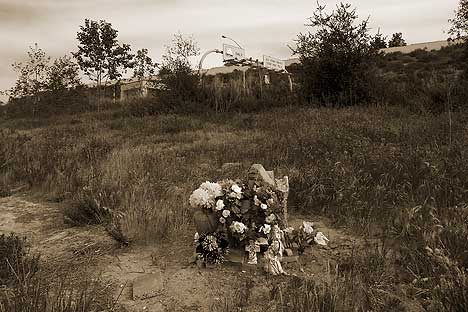
At the Tollgate (form the Series: Bad Trip – Sad Trip)
…I think that I am going to be a big fan of the new Black&White Adjustment layer in CS3. I had been trying to tweak out the sky in this image with my previous workflow: using channels, choose the channel that gives me the best black & white image, copy and paste that channel into my layer stack and then flatten the layer while still in the RGB color mode. It was looking like I was going to add some additional adjustment curves to this image when I remembered the B&W adjustment layer.
So I went back to my original RAW file and started over. I did make some new adjustements in RAW using ACR 4.1 to emphasize the blue in the sky, but there was not much there. Then I added the B&W adjustment layer and really hit the blue sliders to the maximum. After that I adjusted the other colors in my B&W adjustment layer to create an image that had the right look and feel for me. I did not use the Hue/Saturation in the B&W adjusment layer, as for now I am preferring to have a seperate H/S adjustment layer in my layer stack.
I am impressed with the resulting image. Instead of having a pretty blown out, almost white-out sky, I have brought out all of the moodyness that was present when I initially made the exposure. This has become a very nice photograph. So now I am thinking of some other troublesome images that might benefit from this new workflow.
Best regards, Doug
 Singular Images
Leave a comment